What Is a JWT?
A JWT is a small, self-contained token used for user authentication in web applications and APIs. When a user logs in, the server generates a JWT and sends it to the user. The user then sends this same token back with every subsequent request — and the server verifies it to confirm identity.
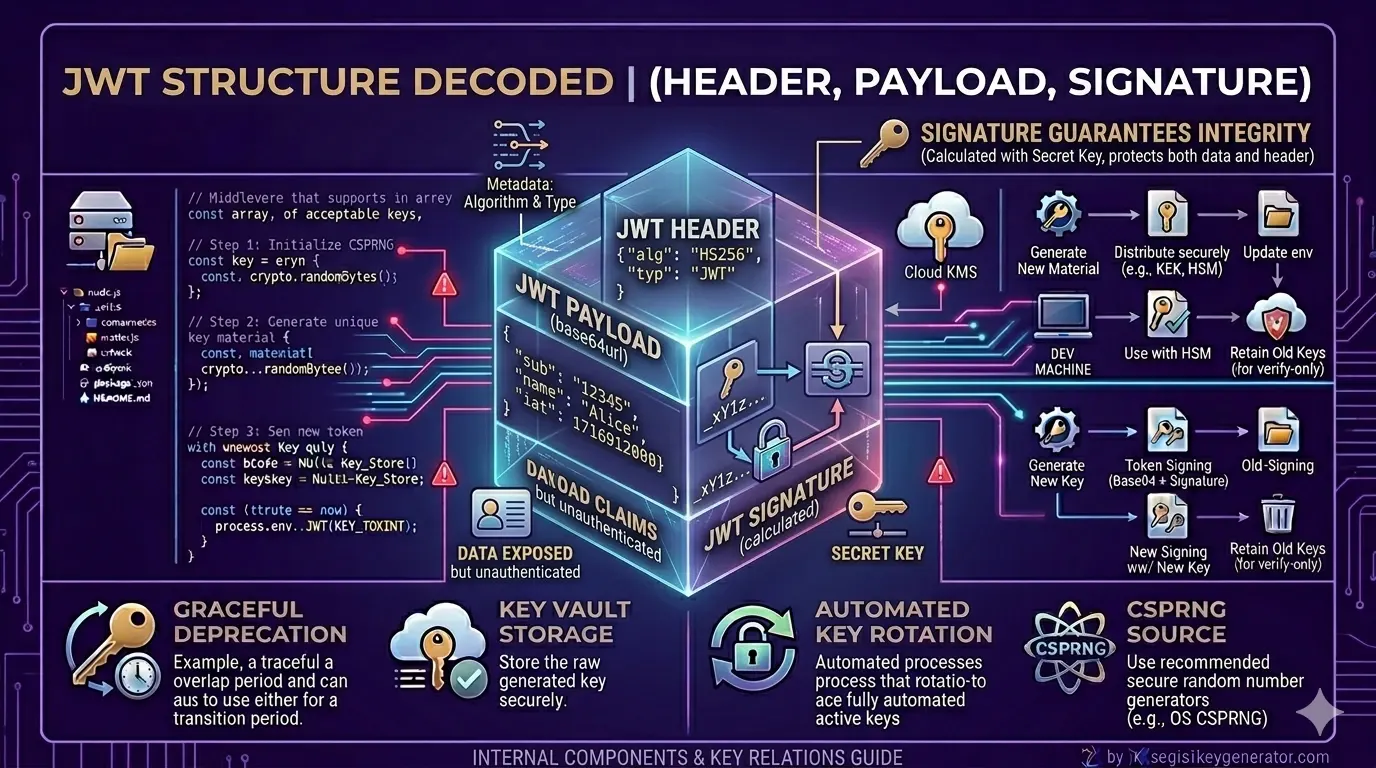
According to the official IETF RFC 7519 specification, a JWT is composed of three Base64URL-encoded parts separated by dots:
Three Main Parts of a JWT
1. What Is the Header?
The header is the first part of a JWT. It contains two key pieces of information about the token itself — the token type and the signing algorithm being used.
{
  "alg": "HS256",
  "typ": "JWT"
}
| Key | Value | Meaning |
|---|---|---|
alg |
HS256 | The signing algorithm used (HMAC SHA-256) |
typ |
JWT | Declares this is a JSON Web Token |
2. What Is the Payload?
The payload is the most important part of a JWT — it contains the actual user data, also called claims. This is the information your application uses to identify and authorize the user.
What a payload can contain:
- User ID — unique identifier for the user
- Username — the user's display name
- Email — user's email address
- Role — access level such as Admin or User
- Expiry Time (
exp) — when the token becomes invalid
| Field | Full Name | Meaning |
|---|---|---|
sub |
Subject | The unique User ID |
name |
Name | The user's display name |
exp |
Expiry | Timestamp when the token expires |
iat |
Issued At | Timestamp when the token was created |
3. What Is the Signature?
The signature is the most important security component of a JWT. It verifies that the token has not been tampered with after it was issued. The signature is created using the following formula:
If anyone tries to modify the payload — for example, changing their role from user to admin — the signature will no longer match when the server verifies it. The token will be immediately rejected. This protection only works when you use a strong, properly generated secret key.
Difference Between Header, Payload, and Signature
| Part | What It Does | Encrypted? | Security Level |
|---|---|---|---|
| Header | Identifies the token type and algorithm | No — Base64URL only | Low |
| Payload | Stores user claims and data | No — Base64URL only | Medium |
| Signature | Verifies token authenticity and integrity | Yes — HMAC / RSA signed | High |
How Does a JWT Work? (Simple Flow)
The complete flow of a JWT from login to access is straightforward:
- User submits login credentials (username + password)
- Server validates credentials and generates a JWT signed with the secret key
- Token is sent back to the user (typically stored in memory or
HttpOnlycookie) - User includes the token in every API request via the
Authorization: Bearerheader - Server verifies the signature using the secret key
- If the signature is valid and the token is not expired, access is granted
You can verify how this flow works in practice using jwt.io — the official JWT debugging tool where you can paste any token and instantly inspect its header, payload, and signature.
Important Things to Remember
- JWTs can be easily decoded — but cannot be verified without the secret key
- Never store sensitive data in the payload — passwords, PINs, or private keys must never go inside a JWT
- Always verify the token on the server side — use
jwt.verify(), neverjwt.decode()alone - Set short expiry times — keep tokens short-lived (15–60 minutes) and use refresh tokens for longer sessions
The Bottom Line
JWT consists of three simple parts — Header, Payload, and Signature. Together, these three create a secure, stateless authentication system that makes user verification fast and efficient across web applications and APIs.
- The Header identifies the token type and algorithm
- The Payload stores user data — but is readable by anyone without a key
- The Signature is the only part that proves a token is genuine
- Always verify the signature on the server — never trust decoded data alone
- Use a cryptographically strong secret key to protect the signature
🔐 Need a secure JWT secret key for your project? Use jwtsecretkeygenerator.com to generate a production-ready key instantly — free, browser-based, and never stored on any server.
Frequently Asked Questions
What are the three parts of a JWT?
A JWT consists of three parts: the Header (contains token type and signing algorithm), the Payload (contains user claims and data), and the Signature (cryptographic proof that the token has not been tampered with). All three are separated by dots and Base64URL encoded.
Is the JWT payload encrypted?
No. The JWT payload is only Base64URL encoded — not encrypted. This means anyone who has access to the token can decode and read the payload. Never store sensitive data like passwords or private keys in the JWT payload.
What is the formula for a JWT signature?
The JWT signature is created using the formula: HMACSHA256(Base64URL(header) + '.' + Base64URL(payload), secretKey). This combines the encoded header, encoded payload, and your secret key to produce a unique signature that proves the token's authenticity.
What happens if someone modifies the JWT payload?
If anyone modifies the JWT payload after it has been signed, the signature will no longer match when the server verifies it. The token will be rejected as invalid, preventing unauthorized access to the application.
